autogeekonline car wax, car care and auto detailing forum Autogeek on TV
car wax, car care and auto detailing forumAutogeekonline autogeekonline car wax, car care and auto detailing forum HomeForumBlogAutogeek.net StoreDetailing Classes with Mike PhillipsvbGarageGalleryDetailing How To'sDetailing How ToFacebookTwitterYouTube

Go Back   Auto Geek Online Auto Detailing Forum > Detailer's Library > Tips, Techniques and How-to Articles for Interacting on Discussion Forums

Register FAQ Upload Photos Search Today's Posts Mark Forums Read

» Paypal Bill Me Later
Reply
 
Thread Tools Display Modes
Old 12-15-2011, 11:37 AM   #1
Director of Training
 
Mike.Phillips@Autogeek's Avatar
 
Join Date: Jun 2009
Location: Stuart, Florida
Posts: 35,923
How to navigate to other pages in a thread

How to navigate to other pages in a thread

I know most of you reading this already know how to do this and probably think this is pretty basic stuff...

I'm here to tell you though that not everyone in the world is Forum Savvy.

With all the magazine advertising we're doing and all the TV shows we're doing plus our other touch points, we attract a lot of people to the AutogeekOnline.net Discussion Forum and not all of these people know that there can be more than one page to a thread let along how to get to the other pages.

So this simple little tutorial is to show them where the numbers are located to allow them to click to different pages in a thread.


How to navigate to other pages in a thread
This is for vBulletin discussion forums but it's also how most discussion forum software is set-up.

First, a THREAD is a linear display or list of messages also called posts or replies.

OP stands for Original Poster, that would be the person that started the thread. For example, because I started this thread, I'm the OP of this thread.

The default page view options are to display 10 messages and then if there's more posts or replies to a thread a new pages is started. When a new page is started the forum software adds little numbers to the top and bottom of each page to enable the person reading the thread to navigate or click to the various pages.

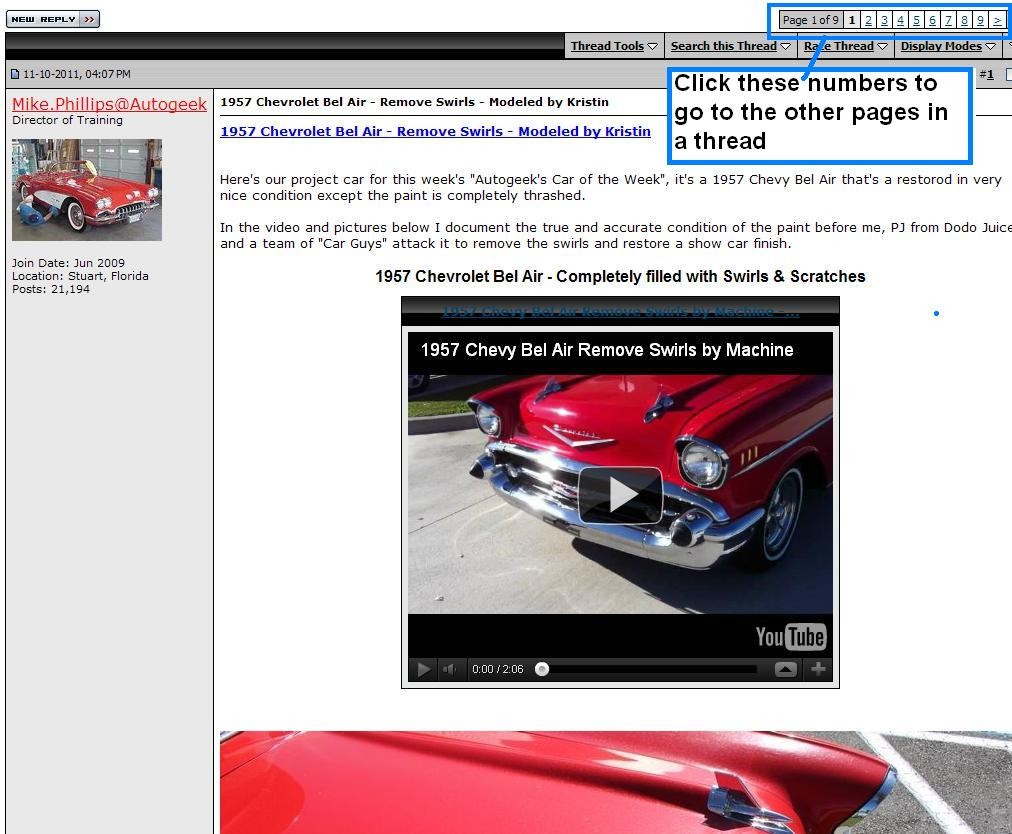
Here are some screenshots that will give you a perspective of where to look and what to click on...


Top of page, right hand side
This is a screenshot showing the small numbers for this thread,

1957 Chevrolet Bel Air - Remove Swirls - Modeled by Kristin


Bottom of page, right hand side

This is a screenshot showing the small numbers for this thread,

Blown 1934 Ford Pick-up - Show Car Makeover - Modeled by Kristin


Hopefully after looking at the screenshots above anyone reading this new to discussion forums will now understand that its' very common for a thread to have multiple pages and when it does how to navigate to them.


Mike.Phillips@Autogeek is offline  
Digg this Post!Add Post to del.icio.usBookmark Post in TechnoratiFurl this Post!twitter
Reply With Quote
Old 12-15-2011, 04:54 PM   #2
Senior Member
 
budinsc's Avatar
 
Join Date: Jul 2011
Location: sc
Posts: 249
Re: How to navigate to other pages in a thread

good info michael! i learned something. merry Christmas and tks for all you do.

budinsc
budinsc is offline  
Digg this Post!Add Post to del.icio.usBookmark Post in TechnoratiFurl this Post!twitter
Reply With Quote
Old 05-30-2012, 02:22 PM   #3
Director of Training
 
Mike.Phillips@Autogeek's Avatar
 
Join Date: Jun 2009
Location: Stuart, Florida
Posts: 35,923
Re: How to navigate to other pages in a thread

I'm continuing today to update my article list and just found I never added this article to my collection under,


Tips, Techniques and How-to Articles for Interacting on Discussion Forums


It will be there by EOD


Mike.Phillips@Autogeek is offline  
Digg this Post!Add Post to del.icio.usBookmark Post in TechnoratiFurl this Post!twitter
Reply With Quote
Reply

Bookmarks

Thread Tools
Display Modes

Posting Rules
You may not post new threads
You may not post replies
You may not post attachments
You may not edit your posts

BB code is On
Smilies are On
[IMG] code is On
HTML code is Off
Trackbacks are On
Pingbacks are On
Refbacks are Off


Similar Threads
Thread Thread Starter Forum Replies Last Post
How to start a new thread on a discussion forum or reply to an existing thread Mike.Phillips@Autogeek Tips, Techniques and How-to Articles for Interacting on Discussion Forums 4 02-27-2013 12:32 PM
A tip to help yourself get great answers when you start a thread Mike.Phillips@Autogeek Tips, Techniques and How-to Articles for Interacting on Discussion Forums 4 12-26-2012 06:47 AM
HOW TO & Introduction Thread Jason Off-Topic 15 06-14-2012 09:54 AM
The Official AutoLavish On-Going Detail Thread - LIVE THREAD! jlb85 Show N' Shine 35 12-14-2010 09:56 PM
HOW TO & Introduction Thread Jason Introduce Yourself 2 06-18-2007 09:26 AM

» June 2013
S M T W T F S
262728293031 1
2 3 4 5 6 7 8
9 10 11 12 13 14 15
16 17 18 19 20 21 22
23 24 25 26 27 28 29
30 123456
» Car Care Brands
Detailer's Pro Series Car Care Products
Powered by vBadvanced CMPS v3.2.1

All times are GMT -5. The time now is 10:07 PM.


Powered by vBulletin® Version 3.8.4
Copyright ©2000 - 2013, Jelsoft Enterprises Ltd.
Copyright ©PBMA - Autogeekonline.net® All Rights Reserved.

1 2 3 4 5 6 7 8 9 10 11 12 13 14 15 16 17 18 19 20 21 22 23 24 25 26 27 28 29 30 31 32 33 34 35 36 37 38 39 40 41 42 43 44 45 46 47 48 49 50 51 52 53