autogeekonline car wax, car care and auto detailing forum Autogeek on TV
car wax, car care and auto detailing forumAutogeekonline autogeekonline car wax, car care and auto detailing forum HomeForumBlogAutogeek.net StoreDetailing Classes with Mike PhillipsvbGarageGalleryDetailing How To'sDetailing How ToFacebookTwitterYouTube

Go Back   Auto Geek Online Auto Detailing Forum > Detailer's Library > Tips, Techniques and How-to Articles for Interacting on Discussion Forums

Register FAQ Upload Photos Search Today's Posts Mark Forums Read

» Autogeek Online Classes
Reply
 
Thread Tools Display Modes
Old 07-06-2010, 07:27 AM   #1
Director of Training
 
Mike.Phillips@Autogeek's Avatar
 
Join Date: Jun 2009
Location: Stuart, Florida
Posts: 25,044
How-To capture swirls, scratches, etchings and other surface defects with your camera

How-To capture swirls, scratches, etchings and other surface defects with your camera


Quote:
Due credit where credit is due
This article was originally written by me, (Mike Phillips), and posted to MeguiarsOnline on May 28th, 2006 and it can be found here,

How-To capture swirls, scratches, etchings and other surface defects with your camera

Sometimes I will try to re-write articles I have written on the Internet and sometimes it's really hard to re-write what I've already written, in these cases it's easier to share the original article and provide a link back to the originating site out of respect for the other site and the law, and for good reasons of good Netiquette. I don't like seeing my articles stolen or re-written by others and then seeing my worked presented as someone else's and wouldn't do that to anyone else.

-Mike Phillips


A few tips and techniques for helping your camera to focus on the surface so you can capture the defects in the paint you're hoping to remove.


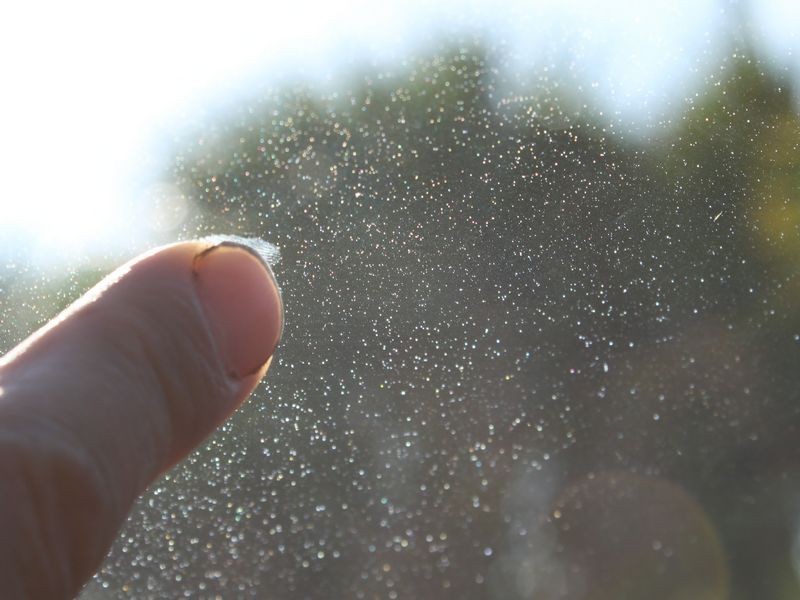
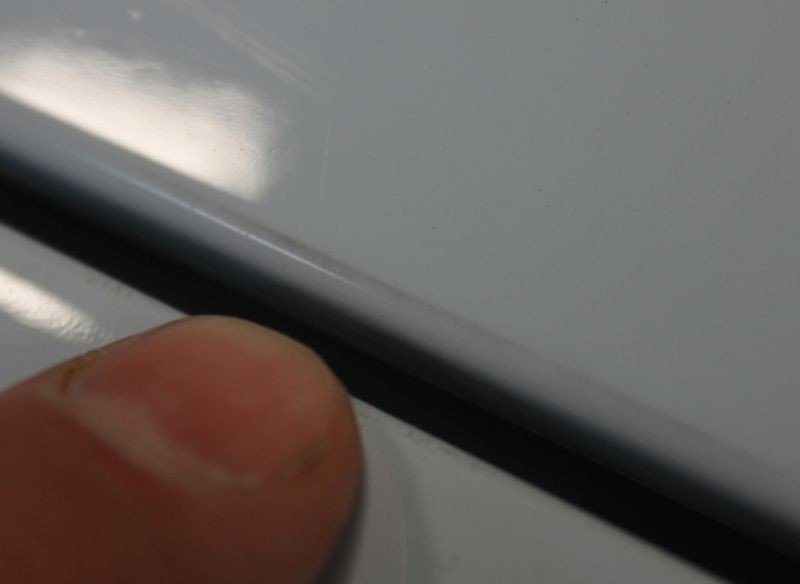
Finger Pointing Focus Technique
Besides figuring out the right camera setting for your specific camera, another quick, simple way to help your camera focus on a defect you're trying to capture with a picture is to simply place your index finger close to the defect on or hovering over the finish then carefully captures a few pictures and in most cases you'll get a couple you can use on the Internet. This works for Swirls, Scratches, Etchings, Water Spots both Type I and Type II, Stains, Oxidation, etc. Basically anything on the surface. The reason you need to give the camera something to focus on is because often times when taking shots of a large, uniform, flat surface, once any focus points are zoomed out of the picture your camera has nothing to sense and focus on.

Detailing Clay
You can also use a little piece of detailing clay because in most cases you have some detailing clay around. If the paint is clean and it should when trying to capture pictures of surface defects, then when you're done taking your pictures you should be okay to put the little piece of clay back into the large piece you took it from or just through it away. A small piece will work fine. (See picture below).

Coin
A coin can also be used if the surface is flat and horizontal like the hood. Place the coin carefully onto the paint so as not to instill a scratch. If you already have a flawless, swirl-free finish then maybe stick with the finger or clay technique. If you're getting ready to buff the car out then as long as you're careful you'll be okay; remember you're going to be buffing out the paint and likely the defect you're trying to capture with a picture.


Cobweb Swirls or Cobweb-Effect


Cobweb Swirls or Cobweb-Effect


Cobweb Swirls or Cobweb-Effect


Detailing Clay
Another way to help your camera focus on a surface defect is to place something on the surface of the paint, for example in the below picture we placed a small piece of detailing clay on the paint, then let the camera auto focus and wa-la, perfectly captured swirls, scratches and a bird dropping etching in the paint.


Random, Isolated Deeper Scratch
Scratch Removed using Ultimate Compound


An Isolated Bird Dropping Etching
How To Remove a Bird Dropping Etching by Hand using M105 Ultra Cut Compound


Photos courtesy of MeguiarsOnline.com


Mike.Phillips@Autogeek is online now  
Digg this Post!Add Post to del.icio.usBookmark Post in TechnoratiFurl this Post!twitter
Reply With Quote
Old 07-06-2010, 10:43 PM   #2
Senior Member
 
Join Date: May 2010
Posts: 206
Re: How-To capture swirls, scratches, etchings and other surface defects with your camera

Nice post up Mike! I never thought of using a piece of clay. My Nikon D5000 takes ultra sharp pictures, however I usually need to be arms length to get good pictures from it. That's kind of hard to hold one arm to the paint while the other arm is taking the picture. I always use the manual focus on my lens as that seems to help too!
jayhkr is offline  
Digg this Post!Add Post to del.icio.usBookmark Post in TechnoratiFurl this Post!twitter
Reply With Quote
Old 07-07-2010, 01:24 AM   #3
Senior Member
 
ZEE BEST's Avatar
 
Join Date: Nov 2009
Location: Pasadena, CA
Posts: 6,759
Re: How-To capture swirls, scratches, etchings and other surface defects with your camera

I never knew that pointing a finger in the picture will help the camera focus!!! I thought it was 100% because they're just pointing out the defect. Thanks MIKE!!!
__________________
2009 Nissan 370z, Brilliant Silver Metallic, 6MT, Sport Package
Mark
ZEE BEST is online now  
Digg this Post!Add Post to del.icio.usBookmark Post in TechnoratiFurl this Post!twitter
Reply With Quote
Old 10-10-2010, 01:08 PM   #4
Senior Member
 
dougaross's Avatar
 
Join Date: Aug 2010
Location: Rochester NY
Posts: 1,437
Re: How-To capture swirls, scratches, etchings and other surface defects with your camera

A small piece of masking tape would perform the same function. It would be useful on vertical surfaces.
__________________
Doug
2008 Audi A6 S-line
dougaross is online now  
Digg this Post!Add Post to del.icio.usBookmark Post in TechnoratiFurl this Post!twitter
Reply With Quote
Old 10-10-2010, 02:01 PM   #5
Senior Member
 
Rob T's Avatar
 
Join Date: Jul 2007
Location: SoCal
Posts: 1,114
Re: How-To capture swirls, scratches, etchings and other surface defects with your camera

Focusing can be a challenge on painted surfaces. The real key to bringing out the swirls in photos is the lighting. Lighting is always the key to photography.
Rob T is offline  
Digg this Post!Add Post to del.icio.usBookmark Post in TechnoratiFurl this Post!twitter
Reply With Quote
Old 10-21-2010, 12:23 PM   #6
Senior Member
 
AndrewBall's Avatar
 
Join Date: Sep 2010
Location: West Chester, PA
Posts: 296
Re: How-To capture swirls, scratches, etchings and other surface defects with your camera

Quote:
Originally Posted by Rob T View Post
The real key to bringing out the swirls in photos is the lighting. Lighting is always the key to photography.
You Speak the truth my man.

lighting for taking pictures of detailed cars is extremely difficult. On this forum we are just trying to show details of the finish but to capture the entire car its a much different process.

I've had the opportunity to work with one of the automotive industries greats. Michael Furman Automotive photographer.

A lot goes into creating his images.

for example, he uses a 40 foot long soft box with over 12 lights in it. the angle of the light bank in relation to the vehicle on more then one axis greatly affects the final image.


Now for our uses, we dont want a large soft light source, if we are trying to show surface defects. For say, a Before Shot.

You need a small specular light source. This will have a similar affect as the sun does.

This is why the brinkman swirl finder light works so well.

The small specular light source hits the scratches and sends highlights through them as the light scatters. revealing them with great distinction.

The reason work lamps work so well is that are relatively small but they are square (making them specular) and the contrast ration from the light source to the edge is so high. So you see the scratches.

Trying to make your after shots look more dramatic? Use Contrasty locations. areas with bright like and dark shadows. this will make the reflections look deeper. Diffused light is the best but most of use aren't going to drive around and find a great spot that will be up to some photographer to do. but your uses remember these little tips it can make your images that much more impressive.
AndrewBall is offline  
Digg this Post!Add Post to del.icio.usBookmark Post in TechnoratiFurl this Post!twitter
Reply With Quote
Old 10-21-2010, 07:34 PM   #7
Senior Member
 
Rob T's Avatar
 
Join Date: Jul 2007
Location: SoCal
Posts: 1,114
Re: How-To capture swirls, scratches, etchings and other surface defects with your camera

Quote:
Originally Posted by AndrewBall View Post
You Speak the truth my man.

lighting for taking pictures of detailed cars is extremely difficult. On this forum we are just trying to show details of the finish but to capture the entire car its a much different process.

I've had the opportunity to work with one of the automotive industries greats. Michael Furman Automotive photographer.

A lot goes into creating his images.

for example, he uses a 40 foot long soft box with over 12 lights in it. the angle of the light bank in relation to the vehicle on more then one axis greatly affects the final image.


Now for our uses, we dont want a large soft light source, if we are trying to show surface defects. For say, a Before Shot.

You need a small specular light source. This will have a similar affect as the sun does.

This is why the brinkman swirl finder light works so well.

The small specular light source hits the scratches and sends highlights through them as the light scatters. revealing them with great distinction.

The reason work lamps work so well is that are relatively small but they are square (making them specular) and the contrast ration from the light source to the edge is so high. So you see the scratches.

Trying to make your after shots look more dramatic? Use Contrasty locations. areas with bright like and dark shadows. this will make the reflections look deeper. Diffused light is the best but most of use aren't going to drive around and find a great spot that will be up to some photographer to do. but your uses remember these little tips it can make your images that much more impressive.
Great stuff!
Rob T is offline  
Digg this Post!Add Post to del.icio.usBookmark Post in TechnoratiFurl this Post!twitter
Reply With Quote
Old 11-18-2010, 01:37 AM   #8
Senior Member
 
jcarson112's Avatar
 
Join Date: Jul 2010
Location: Tacoma, WA
Posts: 194
Re: How-To capture swirls, scratches, etchings and other surface defects with your camera

For those with a DSLR, it is far easier to capture the defects in paint by switching off the auto focus.
__________________
Jeff C.
jcarson112 is offline  
Digg this Post!Add Post to del.icio.usBookmark Post in TechnoratiFurl this Post!twitter
Reply With Quote
Old 11-18-2010, 10:06 AM   #9
Senior Member
 
Rob T's Avatar
 
Join Date: Jul 2007
Location: SoCal
Posts: 1,114
Re: How-To capture swirls, scratches, etchings and other surface defects with your camera

Quote:
Originally Posted by jcarson112 View Post
For those with a DSLR, it is far easier to capture the defects in paint by switching off the auto focus.
It isn't a question of being able to easily capture the defects by turning off the auto focus, but rather whether you can focus on the defect better with auto focus off.

Generally I would say yes, because a shiny paint surface is difficult for AF systems to focus on.
Rob T is offline  
Digg this Post!Add Post to del.icio.usBookmark Post in TechnoratiFurl this Post!twitter
Reply With Quote
Old 11-18-2010, 11:52 AM   #10
Senior Member
 
Fly bye's Avatar
 
Join Date: Nov 2007
Posts: 794
Re: How-To capture swirls, scratches, etchings and other surface defects with your camera


I sometimes use AF to achieve focus, then switch to MF so the focal length stays put.


Fly bye is offline  
Digg this Post!Add Post to del.icio.usBookmark Post in TechnoratiFurl this Post!twitter
Reply With Quote
Reply

Bookmarks

Thread Tools
Display Modes

Posting Rules
You may not post new threads
You may not post replies
You may not post attachments
You may not edit your posts

BB code is On
Smilies are On
[IMG] code is On
HTML code is Off
Trackbacks are On
Pingbacks are On
Refbacks are Off


» May 2012
S M T W T F S
2930 1 2 3 4 5
6 7 8 9 10 11 12
13 14 15 16 17 18 19
20 21 22 23 24 25 26
27 28 29 30 31 12
» Car Care Brands
Cobra Microfiber Products
Powered by vBadvanced CMPS v3.2.1

All times are GMT -5. The time now is 09:06 AM.


Powered by vBulletin® Version 3.8.4
Copyright ©2000 - 2012, Jelsoft Enterprises Ltd.
Copyright ©PBMA - Autogeekonline.net® All Rights Reserved.

1 2 3 4 5 6 7 8 9 10 11 12 13 14 15 16 17 18 19 20 21 22 23 24 25 26 27 28 29 30 31 32 33 34 35 36 37 38 39 40 41 42 43 44 45 46 47 48 49