autogeekonline car wax, car care and auto detailing forum Autogeek on TV
car wax, car care and auto detailing forumAutogeekonline autogeekonline car wax, car care and auto detailing forum HomeForumBlogAutogeek.net StoreDetailing Classes with Mike PhillipsvbGarageGalleryDetailing How To'sDetailing How ToFacebookTwitterYouTube

Go Back   Auto Geek Online Auto Detailing Forum > Detailer's Library > Tips, Techniques and How-to Articles for Interacting on Discussion Forums

Register FAQ Upload Photos Search Today's Posts Mark Forums Read

» Paypal Bill Me Later
Reply
 
Thread Tools Display Modes
Old 10-19-2009, 06:46 PM   #1
Director of Training
 
Mike.Phillips@Autogeek's Avatar
 
Join Date: Jun 2009
Location: Stuart, Florida
Posts: 35,347
How to upload a photo into your Autogeek Photo Gallery

How to upload a photo into your Autogeek Photo Gallery


This how-to article will show you how to upload a photo on your computer into your photo gallery that you get with your Autogeek discussion forum membership.

It's important to resize your pictures first in an effort to be a good steward of the Autogeek resources; we'll write a how-to article for that in the near future.

First, make sure you're logged-in to the Autogeek forum. If you're not sure how to tell if you're logged in, here's an article that will show you how to tell.

How to tell if you're logged into the forum?


Next, locate the text link in the gray horizontal navigation bar that runs across the top of every page of the forum and >click< on it.
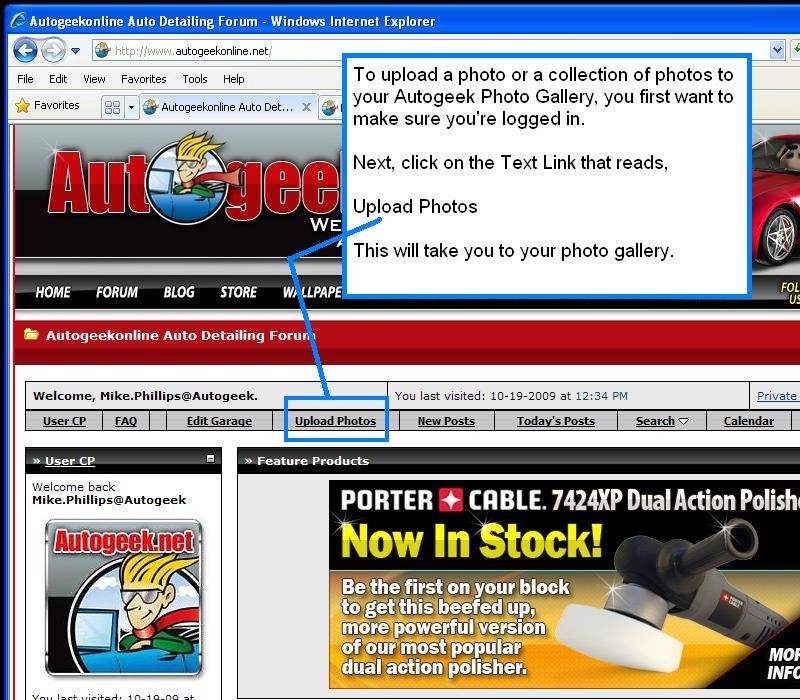


Next, you need to know where your photos are on your computer that you want to upload. This may seem like a no-brainer but sometimes Newbies to computers and digital cameras know their photos are on their computer, but they don't know where.


So make sure you know the location of the folder that holds the photos you want to upload because you're going to need to tell the PhotoPost Gallery where the photos are stored by browsing to them.


After clicking to your gallery, you'll see a screen that looks like this,
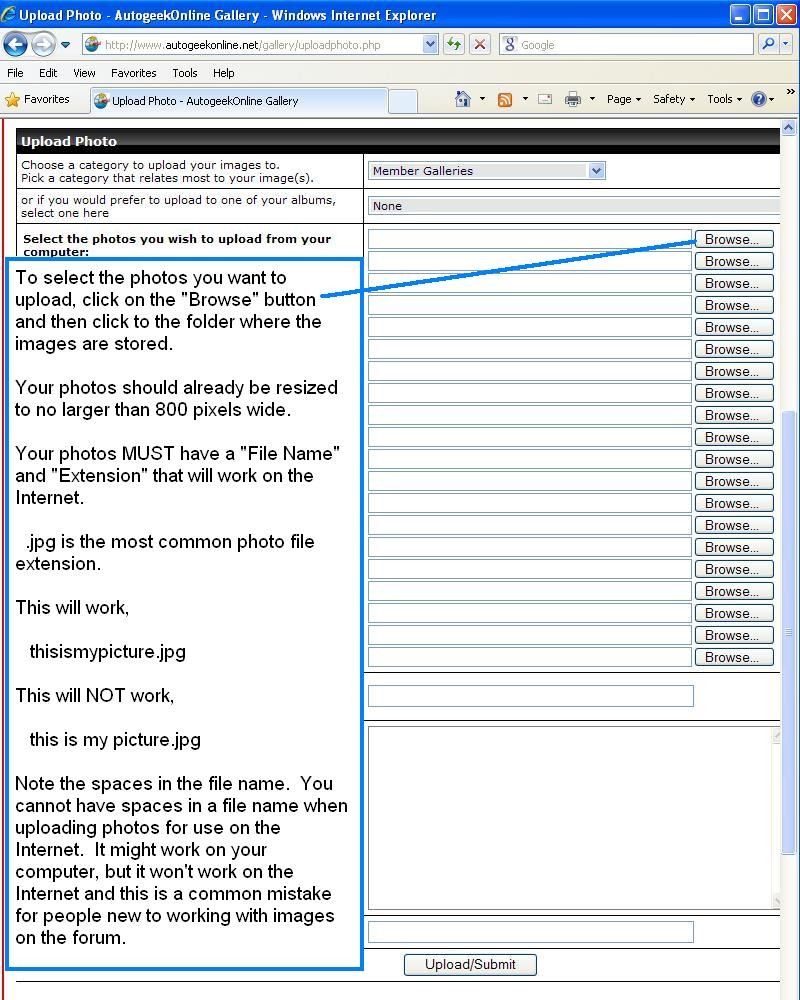


If you have more than one photo to upload, continue to >click< on the Browse button and select another photo. Remember which photos you have added and try not to select the same photo twice.


Next, add a title, description and keywords for your photos and then >click< on the Upload/Submit button. If you want to add different titles, descriptions and keywords for each photo you will have a chance to do this in the next screen when uploading multiple pictures.
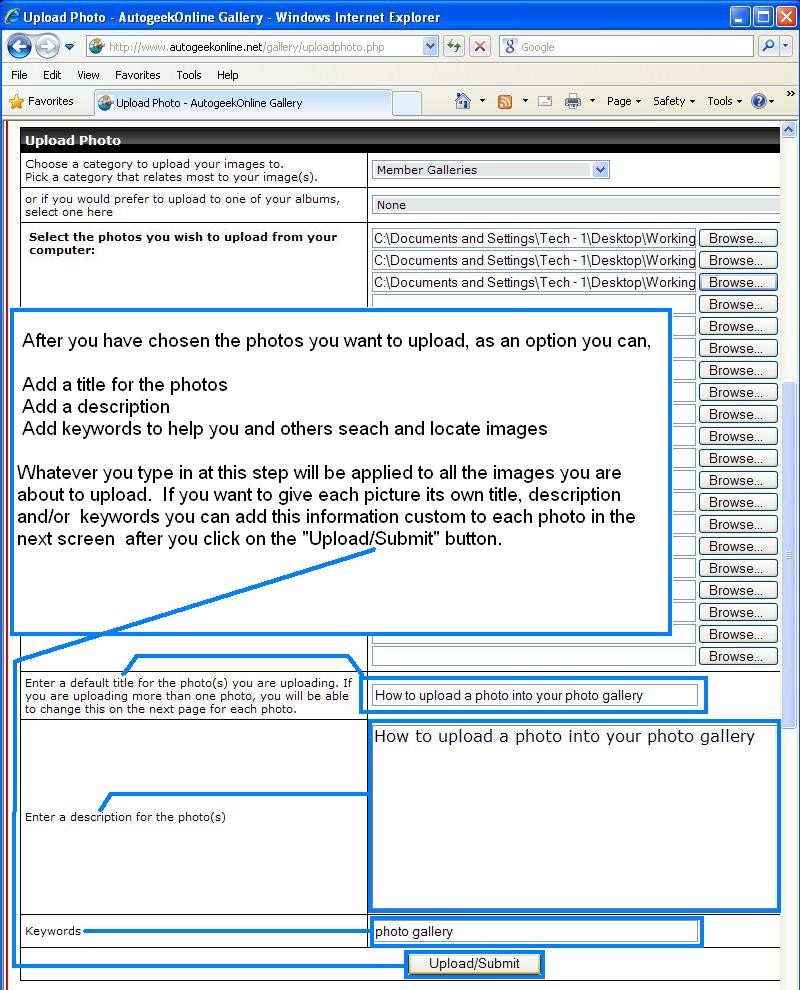


Ta da! That's it, you have just successfully uploaded your photos into your photo gallery here on the Autogeek Online Discussion Forum.

Next we'll take a look at how to insert your photos into your messages.


Mike.Phillips@Autogeek is online now  
Digg this Post!Add Post to del.icio.usBookmark Post in TechnoratiFurl this Post!twitter
Reply With Quote
Old 10-19-2009, 06:53 PM   #2
Senior Member
 
Harleyguy's Avatar
 
Join Date: Jan 2009
Location: Parkland South Florida
Posts: 2,333
Re: How to upload a photo into your Autogeek Photo Gallery

Great write up Mike that should save alot of PM's
__________________
Adam
If things don't get better my Avatar is history
Harleyguy is offline  
Digg this Post!Add Post to del.icio.usBookmark Post in TechnoratiFurl this Post!twitter
Reply With Quote
Old 08-23-2010, 07:00 AM   #3
S2K
Senior Member
 
S2K's Avatar
 
Join Date: Jul 2010
Posts: 1,036
Re: How to upload a photo into your Autogeek Photo Gallery

How can I move photos I have already uploaded into different folders? I figured out out to create folders but I can't seem to figure out how to move them, or can I?
S2K is offline  
Digg this Post!Add Post to del.icio.usBookmark Post in TechnoratiFurl this Post!twitter
Reply With Quote
Old 08-23-2010, 07:41 AM   #4
Director of Training
 
Mike.Phillips@Autogeek's Avatar
 
Join Date: Jun 2009
Location: Stuart, Florida
Posts: 35,347
Re: How to upload a photo into your Autogeek Photo Gallery

Quote:
Originally Posted by S2K View Post
How can I move photos I have already uploaded into different folders? I figured out out to create folders but I can't seem to figure out how to move them, or can I?
I don't think you can move them, I'm not sure I can move them in via the Admin interface as I've uploaded photos into the wrong gallery and tried... ended up doing it the old fashioned way...

Delete photos in wrong folders
Re-upload photos into right folders


What a pain...

If you upload a lot of photos it does help to have a lot of dedicated folders and/or tag them really well to make it easier to find them via the search option.


Mike.Phillips@Autogeek is online now  
Digg this Post!Add Post to del.icio.usBookmark Post in TechnoratiFurl this Post!twitter
Reply With Quote
Old 08-23-2010, 07:55 AM   #5
S2K
Senior Member
 
S2K's Avatar
 
Join Date: Jul 2010
Posts: 1,036
Re: How to upload a photo into your Autogeek Photo Gallery

Quote:
Originally Posted by Mike.Phillips@Autogeek View Post
I don't think you can move them, I'm not sure I can move them in via the Admin interface as I've uploaded photos into the wrong gallery and tried... ended up doing it the old fashioned way...

Delete photos in wrong folders
Re-upload photos into right folders


What a pain...

If you upload a lot of photos it does help to have a lot of dedicated folders and/or tag them really well to make it easier to find them via the search option.


Thanks Mike,
Good thing I don't have a lot in there yet, I was just trying to organize things better, like you said so I can find them.
S2K is offline  
Digg this Post!Add Post to del.icio.usBookmark Post in TechnoratiFurl this Post!twitter
Reply With Quote
Old 08-23-2010, 08:27 AM   #6
Senior Member
 
A4 1.8tqm's Avatar
 
Join Date: Apr 2009
Location: Edmonds, Wa.
Posts: 1,933
Re: How to upload a photo into your Autogeek Photo Gallery

Quote:
Originally Posted by S2K View Post
How can I move photos I have already uploaded into different folders? I figured out out to create folders but I can't seem to figure out how to move them, or can I?
You can, go to the photo you want to move to a different album and select "edit photo" choose "move to album" then choose the destination album and click "Save changes".

IMO, FWIW...

I don't use the Autogeek photo gallery due to the simple inconvenience's of:

1- Having to select each photo one by one for upload. In my computer, my files are sorted into many specific folders so I know where everything is, making it quite a chore to navigate to a specific picture folder multiple times in order to upload several photos.

2- Inability to Resize/Crop or edit. I don't like to keep multiple copies of the same picture/file, but rather the full quality version on my computer and the resized/cropped version uploaded for posting.

3- All the other features included in free online photo gallery's.

Maybe I'm just stubborn, but the "all in one" convenience of photobucket etc. far out weigh the severely limited Autogeek Photo Gallery. I know it sucks when people end up leaving red X's because of moved/deleted pics (If they use up all the free space, why not just start a new free account??), but I for one will not use the gallery unless it gets a major overhaul. My $0.02
__________________
David
My YouTube
pugetsoundvideo.com
A4 1.8tqm is offline  
Digg this Post!Add Post to del.icio.usBookmark Post in TechnoratiFurl this Post!twitter
Reply With Quote
Old 09-29-2010, 09:02 PM   #7
Senior Member
 
Kurt_s's Avatar
 
Join Date: Dec 2009
Location: Thousand Oaks, CA
Posts: 1,368
Re: How to upload a photo into your Autogeek Photo Gallery

Hi Mike,
I'm reasonably handy with a computer having played with PCs since the early 80's, and own both Windows and Mac computers.

Maybe I'm doing something wrong but this is not a user friendly system.

I've had to edit and rename each picture, then try to upload them. They seem to get stuck in a netherworld until I can process them. I'd like to put them into separate folders so each project or set of pictures can be viewed as a group. I think that I'm setting up a new group of pictures but they get combined with others? Yikes!

It will be easier to post pics as thumbnails. It would helpful if one of the links for inserting images automatically pointed back towards the Autogeek albums or accepted a "my computer" browser selection.

My 2 cents as well.
Kurt_s is offline  
Digg this Post!Add Post to del.icio.usBookmark Post in TechnoratiFurl this Post!twitter
Reply With Quote
Old 09-30-2010, 12:02 AM   #8
Senior Member
 
Shade Tree's Avatar
 
Join Date: Feb 2010
Location: Austin, Texas
Posts: 654
Re: How to upload a photo into your Autogeek Photo Gallery

Quote:
Originally Posted by Kurt_s View Post
Hi Mike,
I'm reasonably handy with a computer having played with PCs since the early 80's, and own both Windows and Mac computers.

Maybe I'm doing something wrong but this is not a user friendly system.

I've had to edit and rename each picture, then try to upload them. They seem to get stuck in a netherworld until I can process them. I'd like to put them into separate folders so each project or set of pictures can be viewed as a group. I think that I'm setting up a new group of pictures but they get combined with others? Yikes!

It will be easier to post pics as thumbnails. It would helpful if one of the links for inserting images automatically pointed back towards the Autogeek albums or accepted a "my computer" browser selection.

My 2 cents as well.
............. which is why I ultimately decided against uploading.
__________________
Shade Tree Auto Detailing
Austin, Texas & surrounding areas
Shade Tree is offline  
Digg this Post!Add Post to del.icio.usBookmark Post in TechnoratiFurl this Post!twitter
Reply With Quote
Old 09-30-2010, 10:18 AM   #9
Director of Training
 
Mike.Phillips@Autogeek's Avatar
 
Join Date: Jun 2009
Location: Stuart, Florida
Posts: 35,347
Re: How to upload a photo into your Autogeek Photo Gallery

Quote:
Originally Posted by Kurt_s View Post

Hi Mike,
I'm reasonably handy with a computer having played with PCs since the early 80's, and own both Windows and Mac computers.

Maybe I'm doing something wrong but this is not a user friendly system.


Remember, I didn't create the software, just did my best to create a tutorial on how to use it. I use it everyday, but understand it can be confusing till you do it once or twice.

I'm going to guess I upload and insert more pictures than most people, more people than anyone I know actually, so it's second nature to me.

I think there's over 200 pictures in this thread alone

Virtual Car Show - South East Rods & Customs in Jupiter, Florida!

in which I,
  • Renamed each file
  • Cropped out the fluff
  • Resized to 800 pixels wide
  • Uploaded to the AG Gallery
  • Inserted into the thread to make it "easy" for everyone to see the pictures

The problem with photo hosting sites like Photobucket is that most people use free accounts and plaster their pictures all over the Internet, then when they run out of free space, they simply delete pictures to make room for new pictures and everywhere this person plastered their pictures will then turn into a red x or a default graphic stating the picture has been deleted.

Kind of takes the value out of a thread.


I've taught hundreds of people how to use PhotoPost Gallery over the years, first at MOL and now here, if you want to call me when you're behind your computer I will be more than happy to walk you through how to upload pictures to your gallery.

To start with, e-mail me a picture you tried to upload and let me try as a way of troubleshooting...

I haven't uploaded a lot of pictures today but here's one I cropped and then uploaded and how have inserted for a second time today, so the system does work and PhotoPost is the Cadillac of photo hosting software for discussion forums. I have one myself on my personal discussion forum, ShowCarGarage.com


Always willing to lend a helping cyberhand...


Mike.Phillips@Autogeek is online now  
Digg this Post!Add Post to del.icio.usBookmark Post in TechnoratiFurl this Post!twitter
Reply With Quote
Old 09-30-2010, 10:21 AM   #10
Director of Training
 
Mike.Phillips@Autogeek's Avatar
 
Join Date: Jun 2009
Location: Stuart, Florida
Posts: 35,347
Re: How to upload a photo into your Autogeek Photo Gallery

Here's the same picture "attached", and while attaching makes it so someone can see your photo, it's pain in the behind whereas "inserting" makes it easy, especially if the picture isn't so wide a person has to horizontal srcoll....


Attached Images
File Type: jpg 1963chevroletImpala.jpg (29.1 KB, 13 views)
Mike.Phillips@Autogeek is online now  
Digg this Post!Add Post to del.icio.usBookmark Post in TechnoratiFurl this Post!twitter
Reply With Quote
Reply

Bookmarks

Thread Tools
Display Modes

Posting Rules
You may not post new threads
You may not post replies
You may not post attachments
You may not edit your posts

BB code is On
Smilies are On
[IMG] code is On
HTML code is Off
Trackbacks are On
Pingbacks are On
Refbacks are Off


Similar Threads
Thread Thread Starter Forum Replies Last Post
The Clearcoat Failure Photo Gallery Archive Mike.Phillips@Autogeek Hot topics and Frequently asked questions 17 11-14-2012 10:14 PM
AutoGeek OWNS autopia, imo bambo2888 Off-Topic 44 03-13-2012 01:01 PM
Autogeek Detailer’s Tool Bag Jason New Car Care Products 26 03-16-2009 08:21 AM
Photo Gallery? img Auto Detailing 101 0 12-28-2008 07:46 PM

» May 2013
S M T W T F S
282930 1 2 3 4
5 6 7 8 9 10 11
12 13 14 15 16 17 18
19 20 21 22 23 24 25
26 27 28 29 30 31 1
» Car Care Brands
DP American Made Car Care Products
Powered by vBadvanced CMPS v3.2.1

All times are GMT -5. The time now is 12:13 PM.


Powered by vBulletin® Version 3.8.4
Copyright ©2000 - 2013, Jelsoft Enterprises Ltd.
Copyright ©PBMA - Autogeekonline.net® All Rights Reserved.

1 2 3 4 5 6 7 8 9 10 11 12 13 14 15 16 17 18 19 20 21 22 23 24 25 26 27 28 29 30 31 32 33 34 35 36 37 38 39 40 41 42 43 44 45 46 47 48 49 50 51 52