 Thanks: 0
 Dislikes: 0
-
-
Re: How to start a new thread on a discussion forum or reply to an existing thread
If you want to start a new thread, the first thing to do is to locate a Forum Group related to your topic.
At the top of each page is a Horizontal Navigation Bar, it looks like this...
How to get to the list of Forum Groups
Click on the word "Forum" and it will take you to the list of "Topical Forum Groups"

How To Locate a Topical Forum Group
Here's a section of the "Topical Forum Groups", if you can't find a group that matches your topic, then post it in Detailing 101

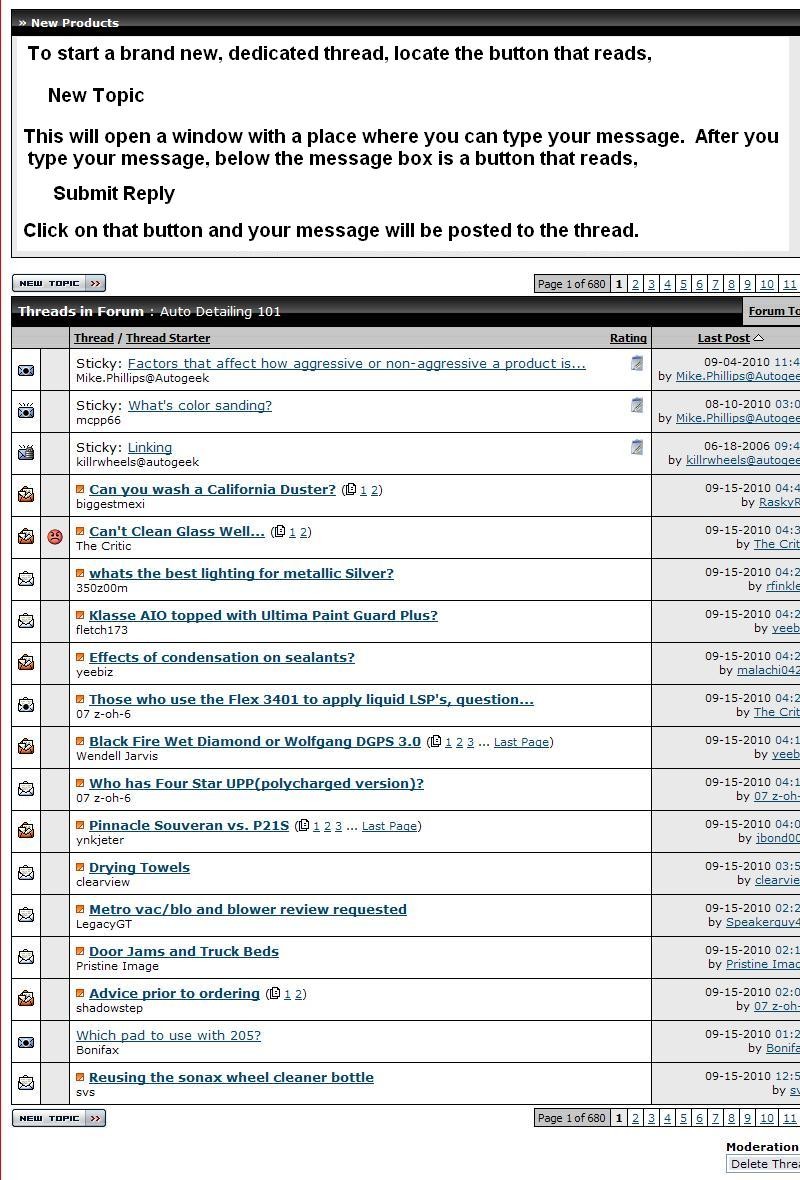
How To Start a Brand New Thread
To start a new thread, locate the button that reads, "New Topic" and click on it. This will bring up a place for you to type your message. After you type your message and you're happy with it, at the bottom of the message box is a button that reads,
Submit Reply
Click on that button and your very own Thread will be posted to the forum!
How To Reply to an Existing Thread
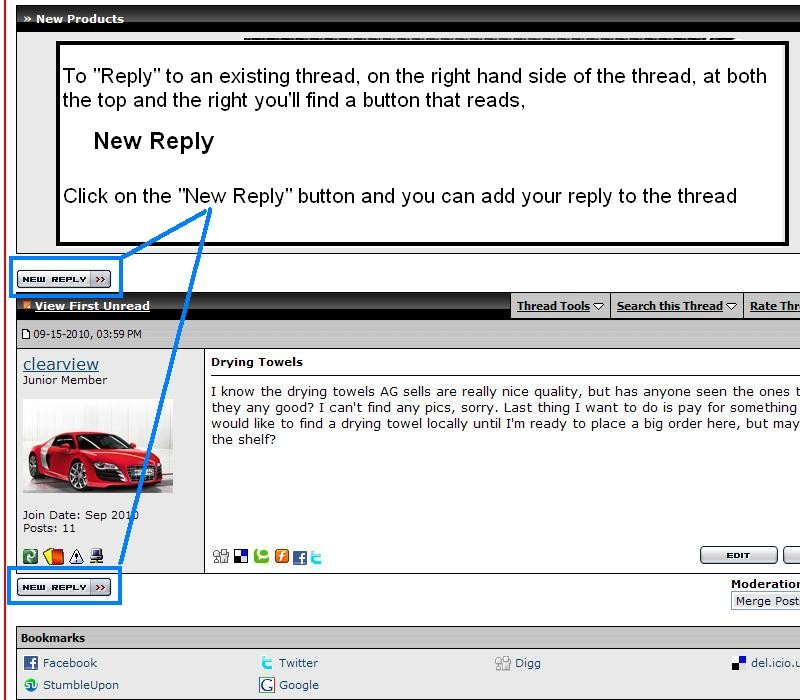
To reply to an existing thread, locate the "New Reply" button, which can be found at the top or bottom right hand side and click on it.
This will bring up a a message box where you can type your reply. When you're finished, there's a Submit Reply button below the message box, click on it and your reply will be posted to the thread.
That's all there is to it!
Once you post your own thread and reply to a couple existing threads, you'll be on your way to a Forum Posting Pro!

-
Super Member

Re: How to start a new thread on a discussion forum or reply to an existing thread
Thanks Mike! I have been tagging since I got here. When I get ready to start a new thread,I"ll reread the tutoral!
-
Re: How to start a new thread on a discussion forum or reply to an existing thread
I had a guy e-mail me yesterday asking me how to start a thread...
Starting a thread is easy once you know how... it's the first time that can be a tad confusing... so hopefully this tutorial will help Lurkers new to forums but interested in joining in the fun get registered and posting with the rest of us...

-
Re: How to start a new thread on a discussion forum or reply to an existing thread
Thanks Mike, you have been a God send over the last few years.

-
Re: How to start a new thread on a discussion forum or reply to an existing thread
 Originally Posted by Bobdhd

Thanks Mike, you have been a God send over the last few years.
Why thank you... everyone on this forum had a "first thread" somewhere... including me....
-
Super Member

Re: How to start a new thread on a discussion forum or reply to an existing thread
Good morning Mike, I made a new thread under product review for Turtle wax ice sealant and spray wax. I am not able to access the thread. What did I do wrong
-
Re: How to start a new thread on a discussion forum or reply to an existing thread
Originally Posted by Buster906
Good morning Mike, I made a new thread under product review for Turtle wax ice sealant and spray wax.
I am not able to access the thread. What did I do wrong
Well technically you broke the forum rules. The forum rules state this forum is to discuss products sold on the Autogeek.com store not products you by at Walmart. Your post was "Reported" and one of our Admins moved it to the "Moderators Forum".
I just moved it back out to Detailing 101 here,
Turtle Wax Ice Products
The Mods were just doing their job by enforcing the rules. Most people never read the rules so don't now the boundaries of this forum or ANY forum. (Think about it? When is the last time anyone reading this joined a forum and started out by reading that forum's rules?
When I join a forum, for example the Mercedes-Benz forum, I don't read the rules before I start posting but I"m also savvy enough to not post stuff I know would be against normal forum rules or normal forum etiquette. Most people don't read forum rules so they post stuff that goes against the rules. Then the post gets reported and the the Mods enforce the rules.
I guess the big picture is this.... the bills for this forum including yours truly are paid for by the sales. There's no such thing as a free lunch. That might be a new concept to many on this earth but live a few years and you'll find out there's really nothing for free. There's a cost to everything. All the college students in favor of the idea of free college as touted by some presidential candidates are simply naive. There's no such thing as free college or free anything.
So the forum rules were writing to keep the discussions on products sold on the Autogeek store since it is the Autogeek store that pays for the server hosting to host this forum, the server hosting to host the pictures, the vBulletin Mechanic we pay to upgrade and maintain the forum and prevent it from being hacked, my time to type out in-depth, how-t answers and articles that help people get successful results the first time instead of ruining something expensive, and on and on and on.
When someone makes a post about something they bought somewhere else, for example the Harbor Freight cheapie polisher, why don't they go to the Harbor Freight Detailing Discussion Forum and make that post? The answer is because Harbor Freight doesn't INVEST in hosting a forum and paying someone with experience to tell their customers how to use the stuff they buy at the Harbor Freight store.
This forum is part of the "Customer Support Experience" our customers get when they invest in us. They invest in us and my boss invests back into them with this forum. He doesn't invest into this forum to answer questions for products where people invested their money somewhere else, like Walmart.
That said, if you look at your thread, I did answer your question in an effort to help you, that's customer support. I realize that you purchase products from us and even though we don't sell Turtle Wax Ice we like to be a helpful and friendly forum and as such sometimes our forum rules simply need to be relaxed.
One of the things I do on this forum is answer questions. You asked a question about Turtle Wax Ice in the thread we're talking about and I answered you and you asked a question in this thread on "How to start a new thread", and in keeping with my history... I answered your question.
I hope my answer makes sense and maybe someday the manufactures of all the products in the world will all invest in their own forums to provide excellent customer service after the purchase like we strive to do here on AGO.
Again, here's the link to your thread...
Turtle Wax Ice Products
Check on it please as I also asked you a question.
-
Super Member
Re: How to start a new thread on a discussion forum or reply to an existing thread
My apologies, I never researched to see if AG sold this brand. No loss. I will stay to giving reviews only AG sells
-
Super Member
Re: How to start a new thread on a discussion forum or reply to an existing thread
Reprimand accepted. I do not wish to be removed as a member. AG forum is a very useful forum for us detail people.
Similar Threads
-
By SON1C in forum Auto Detailing 101
Replies: 10
Last Post: 03-24-2017, 10:38 PM
-
By lane5515 in forum Off-Topic
Replies: 9
Last Post: 03-27-2016, 09:39 AM
-
By Midandtweet in forum Introduce Yourself
Replies: 21
Last Post: 08-26-2011, 08:22 AM
-
By mobiledr.detail313 in forum Off-Topic
Replies: 7
Last Post: 02-17-2008, 08:52 PM
 Members who have read this thread: 1
Posting Permissions
- You may not post new threads
- You may not post replies
- You may not post attachments
- You may not edit your posts
-
Forum Rules
|
| S |
M |
T |
W |
T |
F |
S |
| 31 |
1
|
2
|
3
|
4
|
5
|
6
|
|
7
|
8
|
9
|
10
|
11
|
12
|
13
|
|
14
|
15
|
16
|
17
|
18
|
19
|
20
|
|
21
|
22
|
23
|
24
|
25
|
26
|
27
|
|
28
|
29
|
30
| 1 | 2 | 3 | 4 |
|












 Likes:






 Reply With Quote
Bookmarks