 Thanks: 0
 Likes: 0
 Dislikes: 0
-
If you're going to be a "Forum Person" on ANY forum, help yourself by learning how to work with picture on the Internet
If you're going to be a "Forum Person" on ANY forum, help yourself by learning how to work with picture on the Internet
Below are some articles on working with pictures on the Internet, if you can teach yourself and master these first three picture related tasks you can share pictures on any forum.
It's not that hard folks... If I can do it... you can do it... I work with pictures each and every single day and speaking from experience, it's a really nice "Skill Set" to possess to be able to correctly share pictures on the Internet.
For the most part, sharing pictures on the Internet means sharing pictures on discussion forums and the majority of all the best or top notch discussion forums use vBulletin software for their forum. So once you teach yourself how to work with pictures on a forum like AutogeekOnline.net you will then have the skills to work with pictures on just about any discussion forum your hang out on.
It's not that hard... but there are some good Netiquette practices to follow,
Step 1 - Crop out the fluff
This means cropping or cutting out all the non-important portions of the picture. Here's an example.
First is the original picture,

In this shot, I've cropped out the fluff but still left a portion of the skyline and
a little space in the front, back and bottom of the picture to frame it up.
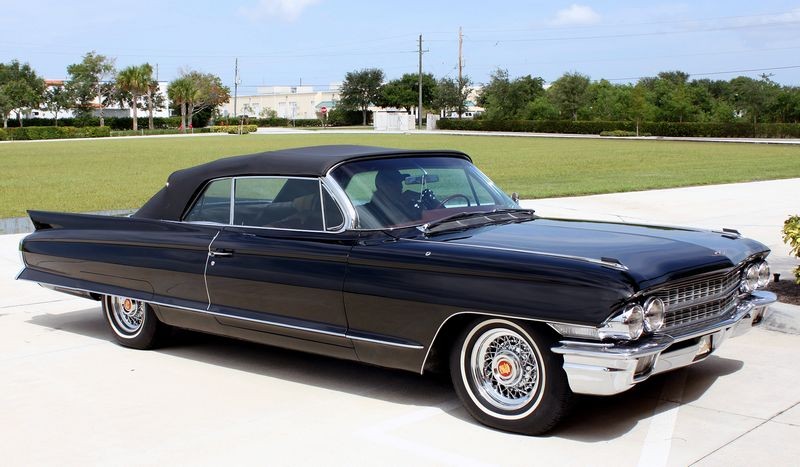
Both these photos started out around 2350 by 1560 pixels. Using the Easy Thumbnails software, after I cropped out the fluff of the original photo I resized both photos to 800 pixels wide for use in this article.
Note: In order to do the cropping step you need some type of photo software that offers the ability to crop photos. PhotoShop and PhotoShop Elements both offer this feature. A free photo software that offers this is called Gimp, I've never used it but I know it can be downloaded for free and I'm sure there are other software programs that offer this ability. I do offer a way to do it online which isn't going to be as fast as having the software on your computer but at least it's an option. See the link for online cropping below.
Step 2 - Resize to about 800 pixels wide
800 pixels wide will fit on the majority of computer screens for the widest spectrum of your readers. Some people like to go larger but my personal thoughts on this topic is 800 pixels is optimum as it's plenty big to see what you're trying to share and no one should have to horizontal scroll to see the picture.
In most cases, if I have to horizontal scroll to see someone's pictures I won't see them because I'll simply click away.
If you can't resize your pictures before sharing them on the forum you're going to loose some readers because it's real annoying to have to horizontal scroll to see the entire picture and the thing is you never see the entire picture because as you scroll to one side of the screen to see the missing portions of the picture, on the other side the picture is scrolling out of view... thus you never see the "entire" picture, just portion of it. So I click away.
Step 3 - Upload to the gallery
I have an article on how to do this.
Step 4 - Insert your picture into your message using the [IMG] tags
Again, I have an article on how to do this.
So if you're going to be active on ANY forum and want to share pictures with you're friends, just take some time to teach yourself how to resize, upload and insert. It works the same on just about any forum.
How to resize your photos before uploading to a photo gallery - Using Easy Thumbnails
How to upload a photo into your Autogeek Photo Gallery
How to insert an image from your photo gallery into your message
Below are some other picture related articles that are helpful but you don't have to read them to get a picture into your message. Note the one on Photobucket... everyone is always recommending Photobucket and Flickr, etc. If you use one of these hosting accounts keep in mind that you only get a certain amount of space and after you use up all the FREE SPACE you either have to,
- Upgrade to a Pro Account
- Start DELETING photos to make room for new photos
If you delete photos because you don't want to pay for a paid account, then EVERYWHERE you shared the pictures you delete will turn into red x's or some type of graphic that states the photo no longer exists.
If you upload your photos to the Autogeek Gallery using the 3 how-to articles I posted links to above, then as long as Max continues to pay our hosting provider, (which will be forever), then you're pictures will always show up.
I get tired of seeing missing pictures because people delete pictures on their hosting account with no regard to the effect it has elsewhere on the Internet.
How-To capture swirls, scratches, etchings and other surface defects with your camera
How-to work with pictures on discussion forums
How to crop out the fluff and resize your pictures! - Using FREE online software!
Photobucket and Missing Pictures
Handiest little picture viewer tool I've been using for years now...

-
Super Member

-
Super Member
Re: If you're going to be a "Forum Person" on ANY forum, help yourself by learning how to work with picture on the Internet
Bobby, try Googles "Picasa" Its free as well. I haven't tried the one you mentioned.
:dancebanana:
Sky's the Limit Car Care
-
Super Member

Re: If you're going to be a "Forum Person" on ANY forum, help yourself by learning how to work with picture on the Internet
Great tips Mike, and I agree. Those who don't share photos SUCK!!!
“Hard times create strong men, strong men create good times, good times create weak men, and weak men create hard times.”
-
Super Member

Re: If you're going to be a "Forum Person" on ANY forum, help yourself by learning how to work with picture on the Internet
I gotta add the easiest one I have and use is Microsoft Office Picture Manager. It allows you to crop, resize, compress and even save pictures fora particular format such as the web.
-
Regular Member

Re: If you're going to be a "Forum Person" on ANY forum, help yourself by learning how to work with picture on the Internet
Another great FREE pic resizer program: Image resizing, do it with PIXresizer
-
Super Member

Re: If you're going to be a "Forum Person" on ANY forum, help yourself by learning how to work with picture on the Internet
My current photo editing program is PhotoScape. Very user friendly.
Kyle
 Originally Posted by Dugdug

Anyways, a customer with a hummer asked me if there was a surcharge for his hummer. I said yes, it's an SUV. He said quote "well it's an H3, so it's not really an suv".......
-
Re: If you're going to be a "Forum Person" on ANY forum, help yourself by learning how to work with picture on the Internet
And this thread just demonstrates the power of a discussion forum with depth... that a forum with active members that together have a knowledge base that deep and wide and when a thread like this is started they chime in with solutions to problems.
Thanks everyone...
If you're reading this and you don't have software that enables you to crop out the fluff and then resize, check out some of the software programs shared above.
I own PhotoShop Elements, it cost around $80.00 retail but came free with a camera I bought. For resizing, I'm pretty much hooked on using Easy Thumbnails. I use it almost everyday and when you set it up the way I show in my tutorial it will resize your pictures without distorting them and that's a feature I want and need.
The key point is that if you already hang out on forums, or you're new to forums but find yourself attracted to them because they are such a strong and powerful resource for obtaining information or sharing information, then teach yourself how to work with pictures for use on forums on the Internet and either step up to the plate and get a Pro account on a place like Photobucket or upload them to a free gallery like the one you get with AutogeekOnline.
I own my own PhotoPost vBGallery v2.0 just so I'll always have a cyber-home for all my pictures.

-
Super Member

Re: If you're going to be a "Forum Person" on ANY forum, help yourself by learning how to work with picture on the Internet
Originally Posted by CEE DOG
Bobby, try Googles "Picasa" Its free as well. I haven't tried the one you mentioned.
Another great benefit with Picasa is that, if you have a Google account (gmail, googledocs, etc), you can upload to a Picasaweb album directly from the application - no need to look for a hosting site; in fact, no need to leave your application!
-
Super Member

Re: If you're going to be a "Forum Person" on ANY forum, help yourself by learning how to work with picture on the Internet
Originally Posted by TroyScherer
I gotta add the easiest one I have and use is Microsoft Office Picture Manager. It allows you to crop, resize, compress and even save pictures fora particular format such as the web.
I would agree 
If you have Office installed, then you should have picture manager installed too. A great easy program to use with photos.
Never be afraid to do something new. Remember, amateurs built the ark; professionals built the titanic
Similar Threads
-
By Rez90 in forum Ask your detailing questions!
Replies: 6
Last Post: 07-11-2017, 06:40 PM
-
By Mike Phillips in forum PICTURES: Wednesday Night Detailing Classes
Replies: 9
Last Post: 03-28-2012, 03:26 PM
-
By 01xtreme in forum Auto Detailing 101
Replies: 17
Last Post: 02-03-2010, 06:00 PM
-
By Dust2Glory in forum Porter Cable 7424XP Dual Action Orbital Polisher
Replies: 6
Last Post: 08-31-2007, 12:43 PM
 Members who have read this thread: 0
There are no members to list at the moment.
Posting Permissions
- You may not post new threads
- You may not post replies
- You may not post attachments
- You may not edit your posts
-
Forum Rules
|
| S |
M |
T |
W |
T |
F |
S |
| 31 |
1
|
2
|
3
|
4
|
5
|
6
|
|
7
|
8
|
9
|
10
|
11
|
12
|
13
|
|
14
|
15
|
16
|
17
|
18
|
19
|
20
|
|
21
|
22
|
23
|
24
|
25
|
26
|
27
|
|
28
|
29
|
30
| 1 | 2 | 3 | 4 |
|



















 Reply With Quote

Bookmarks